

End of Microsoft Navision: what it means for your organisation in 2026
Microsoft Dynamics NAV, still “Navision” to many users, has definitively reached the end: extended support on the last version (NAV 2018) ended in January 2025. Anyone still running NAV in 2026 operates a platform without security updates, without support and with a shrinking ecosystem of partners and developers. This article explains what that means in practice and which migration paths exist.
What does support from Microsoft entail?
According to Microsoft’s lifecycle policy, every version of Navision always receives 10 years of support: five years of mainstream support and another five years of extended support. The difference between these two types of support is as follows:
- Mainstream support: the NAV version receives new features, security-related updates, and non-security-related updates;
- Extended support: the NAV version only receives security-related updates.
We do not need to explain that mainstream support is the best and should be the minimum for any organization. You can use Microsoft support for incidents and bug fixes. Still, your Navision package will also be provided with essential updates necessary, such as custom laws and regulations, such as the GDPR and the AVG. If your package goes to extended support, you can no longer use this and will only receive security-related updates.
What are the consequences of the terminated support for Navision?
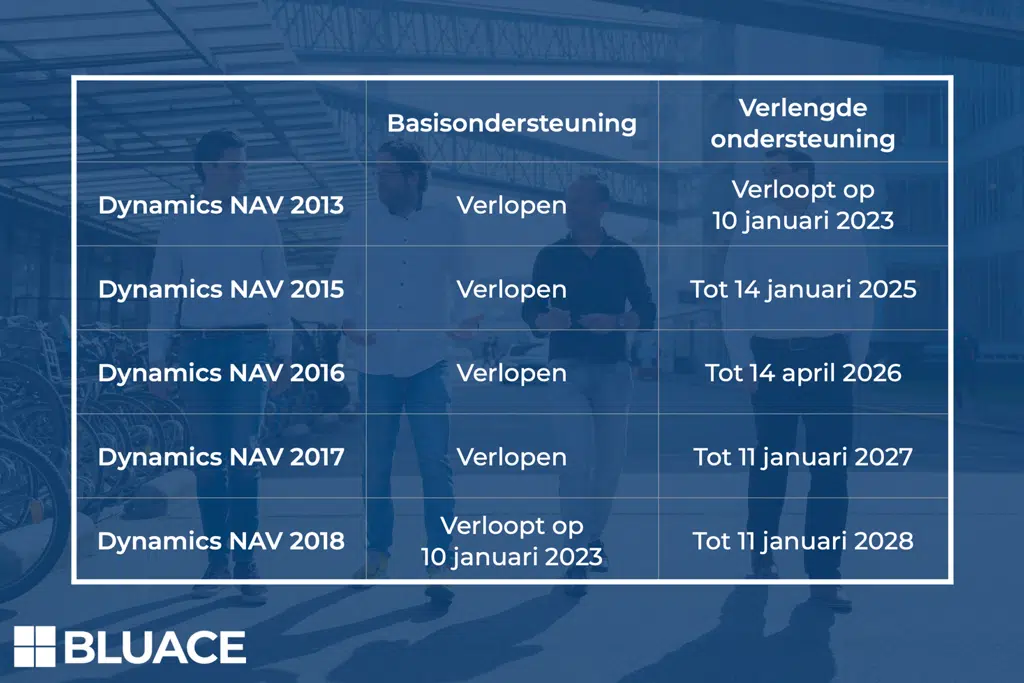
As you can see in the table above, the basic support for the last version of Dynamics NAV from 2018 will expire on January 10, 2023. From that moment on, no version of Navision will receive basic support, and only a few versions will continue to receive security-related updates from the extended support. Once your Navision package lacks basic support, you no longer comply with laws and regulations once changes are implemented. If the extended support with security updates has also expired, you risk becoming a victim of cybercriminals.
What is the replacement for Microsoft Dynamics NAV?
Are you still a Microsoft Dynamics NAV user, and are you curious about your options now that the basic support for the latest Navision version is ending? The most logical step is transitioning to Microsoft Business Central in the cloud. Business Central is the successor to Navision in a familiar guise and is the simplest solution to continue complying with regulations. Business Central is a cloud system with automatic updates based on the latest technologies, standards, and legislation. Additionally, you are immediately provided with an improved platform with many new functionalities.
Where things stand in 2026
The support clock has run out. Mainstream support for NAV 2018 ended in early 2023, extended support in January 2025. No more security patches will appear, not even for critical vulnerabilities. The surrounding environment is also tightening: new Windows Server and SQL Server versions are not tested against NAV, connections with banks, e-invoicing platforms (Peppol) and web services require modern authentication that NAV does not provide out of the box, and the pool of consultants with current NAV knowledge shrinks every year. The risk has shifted from “someday” to an operational and security risk that insurers and auditors increasingly flag.
The migration paths
NAV users essentially have three routes. The first and most common: migrating to Microsoft Dynamics 365 Business Central in the cloud, NAV’s direct successor, sharing its DNA but delivered as a SaaS platform with two major releases per year. Existing NAV data migrates via proven tooling; customisations are re-assessed and replaced where possible by standard functionality or apps from the Microsoft Marketplace. The second route: Business Central on-premises, possible, but you forgo automatic updates and pay for it in management overhead. The third, switching to a different ERP, means leaving the Microsoft stack and is usually the most expensive option, because everything must be rebuilt.
What does a migration look like?
A NAV-to-BC project starts with an analysis of the current environment: which version, how much customisation, which integrations. Then the choice: data migration with re-implementation (most common for older NAV versions, as it cleans up at the same time) or a technical upgrade. Expect a lead time of several months depending on complexity. The biggest pitfall is wanting to transfer fifteen years of customisation one-to-one; it is precisely Business Central’s standard plus targeted apps that keeps the platform maintainable and updatable. At Bluace we run these projects with a fixed approach based on Business Central; read more about our Microsoft ERP approach.
Frequently asked questions about the end of Navision
Do you need more information about Microsoft Business Central?
Our team is happy to assist you.
Shiwan Roepa
+31858200802
info@bluace.nl